 Consider the following scenario: a company exchanges data with trade hubs and other applications. Traditionally this kind of scenario uses point-to-point integration, adding complexity and making it more difficult to replace legacy systems and integrate with SaaS applications. A significant part of the company’s technical debt might be right there.
More and more often we are facing scenarios where client is looking for ways out of monolithic architecture and towards integration solutions with loosely coupled services to provide agility and flexibility. One way of leveraging integration solutions that connect multiple independent systems, both on-premise and in the cloud, is through Azure Integration Services.
Let’s have a look at a simple example. We need to import orders and other data from our ecommerce application (and maybe other applications) to our back-office ERP system. For reliable and secure data exchange, we will use Azure Service Bus as a message broker. Azure Logic Apps will enable automation and orchestration of business processes and provide easy connectivity between services. Data is added to accounting system using API.
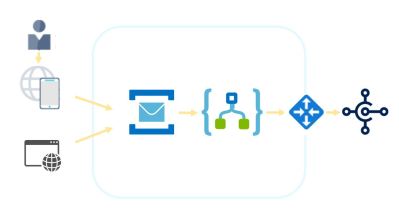 Event messages (orders or other data) enter the system via customer-facing applications. Messages are sent to Azure Service Bus. Once received, messages are transformed to JSON and mapped to my (system’s) order format using transformation maps. Transformation maps can be created with a number of tools including Enterprise Integration Pack, I chose a Liquid template for JSON transformations with Logic Apps. Once a message is converted, it is ingested into back-office ERP system using API, and in this example I am using Microsoft Business Central, because – well of course I am :).
My flow looks like this:
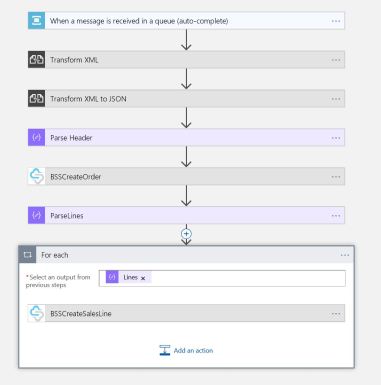
All the connectors used here are standard Logic App connectors, save for the following two: BSSCreateOrder and BSSCreateSalesLine. These are my custom connectors. Dynamics BC (Business Central) offers a number of standard connectors, and it also offers increasing number of API functions that can be used in integration scenarios, but I chose to create my own API and my own connector in this example.
I am simulating my web application here by (manually) sending an xml formatted order to service bus. And the process of receiving, transforming and importing the message to my ERP system is shown below:
Note, this is a skeleton outline. For Enterprise Integration we would need to secure robustness, monitoring and reusability of the solution, but this is just to show how Logic Apps can be used to automate integration without coding, whether we are integrating on-premise or cloud solutions.
 Recently I’ve come over a scenario where docker is chosen to easily spin up demo environments for Dynamics NAV, tailored for different user cases, different customer industries and solutions. While docker is the preferred option here because it offers advantages such as portability and rapid deployment, it is primarily a tool for dev-ops.
 For many ERP systems, the important part of digital transformation will be integrating with IoT, connecting enterprise system and business solutions with devices and sensors in the field. I will not focus on benefits of this, I will just list a few obvious applications – IoT based real-time production, smart offices and warehouses, smart cities,… is all possible using IoT and existing AI capabilities. For real production systems, you would use one of many excellent end-to-end IoT solutions, that come with both sensors, hubs and APIs, like for example
  Today we will look at how to make an assistant. Despite the title, our assistant is not intended only for Dynamics NAV. In fact, the example shown here is written as extension for Dynamics Financials (Business edition). But a title saying Make your Dynamics NAV/Financials (Business Edition)/Tenerife assistant would be – well outright ridiculous.
 Cloud Talks